
Create & manage access keys
Prepare credentials for eligible MCP clients and Talvi app integrations.
Check that the option is available
Open More.. → AI Agents and locate the intended agent. Use its Access keys action when available.
Not every deployment enables the Talvi MCP server, and not every agent or account can create MCP keys. The credential options depend on deployment settings, the agent’s supported output, and your access policy. A Slack or Teams integration may offer its own credential type even when MCP is unavailable.
Create an MCP access key
- Open Access keys for the correct agent.
- Choose MCP access key under Credential type.
- Select the intended person under Create key for user. If they are missing, check their agent access.
- Note the MCP access URL shown for your deployment.
- Select Create MCP key.
- Copy the full key immediately and store it securely. It is displayed only once.
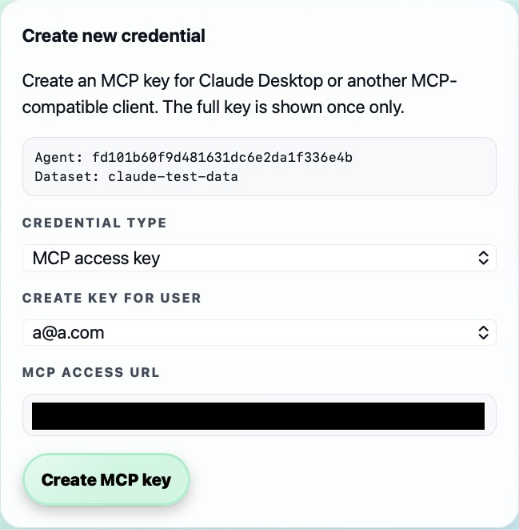
Use the URL and key in the intended MCP client’s connection setup. The local address in the screenshot is an example; a hosted client needs an address it can reach. Do not put private keys in public pages, screenshots, or shared instructions.
Slack and Microsoft Teams credentials
For an agent with the corresponding app output, choose Slack app or Microsoft Teams app as the credential type where offered. The user must first connect to Talvi from that app so their integration identity is available. Select the intended user and create the matching app key.
An app integration key is not interchangeable with an MCP access key. For MCP clients, see Claude, Microsoft Copilot Studio, ChatGPT, and Slackbot. These routes are separate from the Talvi Slack and Teams app outputs.
Review or revoke credentials
Existing credentials shows a masked key hint, type, user, and creation date. Use Revoke when a credential should no longer be accepted. Revocation immediately stops clients using that key; replace it in any intended connection before retiring an old credential.
The Claude Skill download, when available, provides Talvi workflow guidance for Claude. It complements the connection setup; downloading it does not create a connection or replace an access key. Follow the Claude skill upload walkthrough.