
Unpublish and remove content
Find a file in its dataset, hide it, then review it for permanent deletion.
What you will achieve
Remove unwanted content in two stages: Un-publish first changes availability; Talvi Data Cleaner then handles permanent deletion. Check every agent linked to the dataset before you begin.
1. Find the dataset and file
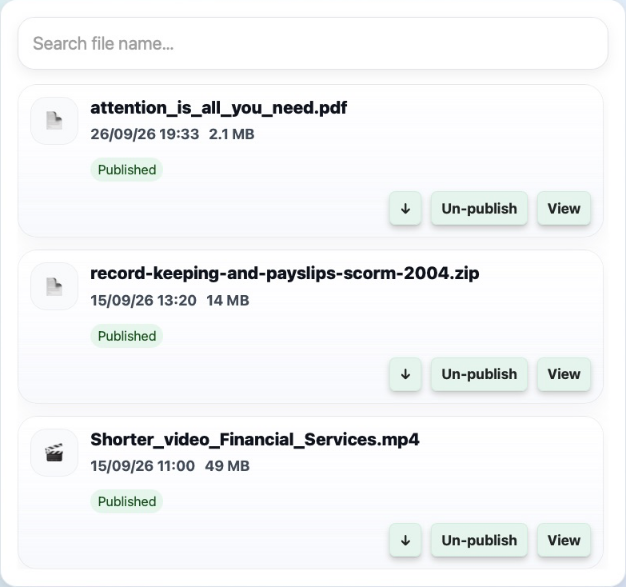
Open More.. → File Management. Identify the dataset from its name and linked AI Agents, then select Open dataset. Use Search file name to find the source and select View to confirm it is the correct file.
2. Unpublish the source
Select Un-publish on that file. Check that its publication state changes. The file remains in the system and can be published again at this stage. Existing conversations may still contain references to it.
If the intention is only to hide the file temporarily, you can stop here.
3. Include unpublished files in the deletion queue
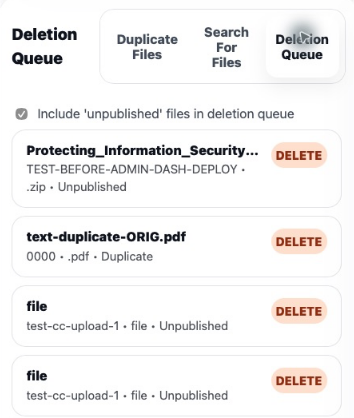
Open Talvi Data Cleaner. Select Begin Talvi Data Clean if no session is active, then open Deletion Queue.

Select Include 'unpublished' files in deletion queue. This includes unpublished content for deletion review; it does not immediately delete it. Review the expanded queue carefully because it can include other unpublished files, not only the one you just hid.
4. Review and delete
Select Commit deletions to open the final review. Verify every filename and dataset. Use Download details of Files if you need a record of the proposed deletion set.
Delete permanently removes the reviewed files. Continue only when that entire list is correct. Pseudo delete (test only, deletes nothing) is a test option; leaving it selected does not perform the real removal.
After a real deletion completes, check the result in File Management. If a source is imported on a schedule, also update the source or schedule as appropriate so a later import does not bring the content back.
Result: the source is first made unavailable, then permanently removed when the final deletion is confirmed.
See also: Talvi Data Cleaner · Clean duplicate and similar files.