
Manage user accounts
Find accounts, update permitted profile fields, and import users from CSV.
Find and review a user
Open More.. → User Management, if available to your account. Filter by Access level, Department, or name/email Search, then open a user’s details.
Review the profile fields, status, department, organisational role, country, language, and compliance flag. The organisational Role field describes the person’s role; Access level controls their Talvi permissions. Only update fields your account is permitted to manage, then choose Save. Use Cancel to leave without saving.
Some privileged accounts and settings are protected, so the same controls are not editable for every user.
Help a user sign in
The user dialog offers Send Magic Log In Link and Create / Change Password when permitted. Send a link only when the user needs it, and check their email address first. The password dialog requires matching password and confirmation values.
See Magic Link sign-in for the recipient’s experience.
Import accounts from CSV
Select Import users, then Download .csv template. Keep the template’s column names exactly as supplied.
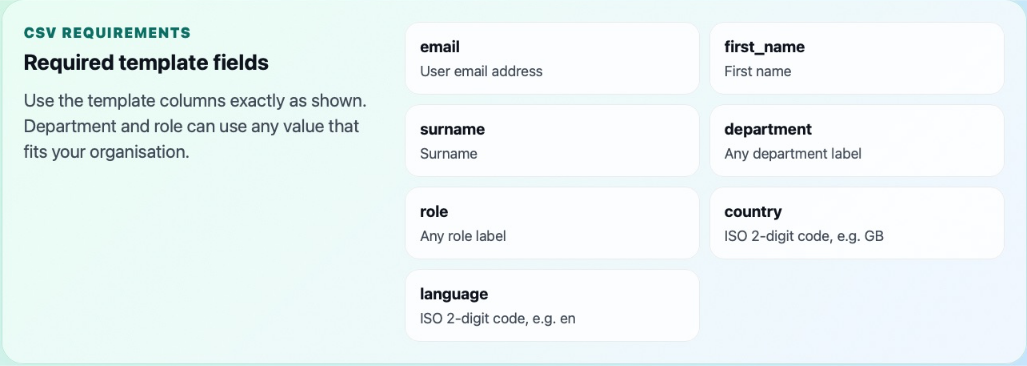
The template includes email, first_name, surname, department, role, country, and language. Use two-letter country and language codes, such as GB and en. Department and organisational role can use labels suitable for your organisation.
Prepare the CSV, select it in the import dialog, review the information, and choose Import. Check the import result before trying again, so you do not mistake a partial result for a complete failure.
Export and agent assignment
Use Export users CSV to open the export options and download the required user information. Keep exports within the audience that needs them.
User creation and agent assignment are separate tasks. Use AI Agents → User Access to ensure the user can reach the intended agent. Users with only one assigned agent do not have another agent to switch to.