Security and Governance
Understand dataset scope, user and agent access, individual MCP credentials, and client governance.
How access is governed
Talvi combines account permissions, dataset and agent scope, individual connection credentials, and content review controls. Your organisation decides what content to make available and who should use it. The enabled controls depend on your deployment and the permissions assigned to your account.
This page describes the operating model. Agree infrastructure security, retention, hosting, and connected AI service requirements with Talvi and your IT team for your implementation.
Datasets define the knowledge scope
A dataset is a managed knowledge base. Administrators select which source content it contains and which AI agents use it. Several agents can share one dataset, so a content change may affect more than one audience.
Where business groups are configured, administrators work within their permitted group scope. The Create Dataset screen shows the selected business group and applicable capacity. The figures below are illustrative, not universal limits.

User access to knowledge is managed through the agents and datasets made available to them. Before assigning an agent, review its dataset and the sensitivity of the whole collection. Do not assume the original LMS or repository’s per-file permissions are automatically reproduced by an import; confirm the access mapping for each integration. See Data Import and Create Dataset.
Users receive access to AI agents
Administrators manage accounts in User Management and assign permitted audiences through AI Agents → User Access. An agent gives its audience a route to its configured knowledge and capabilities. Administration permissions and end-user agent access are separate controls.
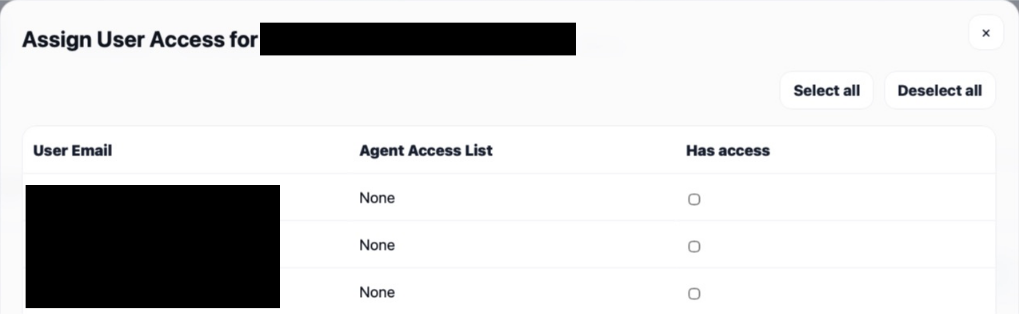
The default agent is available to the active users in its applicable scope. Put restricted knowledge behind an appropriately restricted agent and dataset. Users limited to assigned agents see their permitted choices. Follow Assign users to an AI agent and review access when people change roles or leave.
MCP access belongs to an individual user
An MCP access key—sometimes described as an AI connection token—is created for a selected user and AI agent. The connection carries that user’s identity and the configured agent, dataset, and Talvi instance. It is not a general credential for every dataset in Talvi.
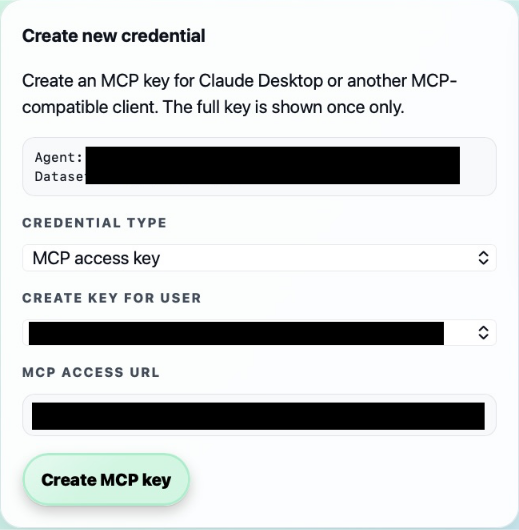
Use one person’s credential for that person’s connection. Your administrator supplies the access URL and the appropriate key. Enter the key only in the approved authorisation or credential form, never in a chat message or shared app package.
For OAuth connections, the client receives a short-lived access token after Talvi authorisation. The backing key remains relevant: revoking it stops authentication for direct-key calls and OAuth calls backed by that key. Previously issued source-viewer links have their own expiry. See MCP access keys & authorisation.
When access changes, review both agent assignments and existing MCP credentials. During offboarding, disable the account through the authorised workflow, revoke its MCP keys, and remove unnecessary client connections. Do not rely on changing the website’s selected agent to retarget an existing MCP connection.
Content governance continues after import
File Management controls publication. Talvi Data Cleaner supports human review of similar files and a final deletion decision. The deletion export provides recorded source references that IT or content owners can use to review originals in upstream systems. Nugget publication and distribution controls how generated learning reaches users.
Imported content and returned evidence can contain sensitive information. Choose the intended dataset and audience before import, and review the handling of source content, prompts, outputs, and logs by every connected service. SSO, source connectors, and other custom capabilities are implementation-dependent; see Single sign-on and Talvi system overview.
Monitor and review
Use dashboard metrics and logs and feedback to investigate usage and failures within your administrative scope. Review enabled third-party tools in MCP Tool Store and each agent’s tool assignment: those provider connections can have their own permissions and data-handling requirements.
For a rollout, verify access with representative users and confirm that each sees the intended knowledge. Recheck after changing datasets, audience assignments, credentials, or client policies. Your Talvi team can help align this model with your organisation’s governance requirements.
If you connect through Microsoft 365
Your Microsoft 365 administrator approves the Talvi app package and its intended audience. Each person then authorises their own Talvi connection. A user must satisfy the requirements on both sides; Microsoft sign-in alone does not create a Talvi MCP credential.

Use the Microsoft agent record to review the available user, permission, data/tool, security, and activity controls. Microsoft’s agent registry guidance explains which actions apply to each agent type. Some panels require additional permissions or licensing.
Follow Connect Microsoft 365 Copilot & Teams for the Talvi-supplied ZIP workflow. For another client, its administrator controls installation and tool availability while Talvi credentials identify the connected user and knowledge scope.