
Chat history & favourites
Return to earlier questions and keep useful conversations easy to find.
Reopen a conversation
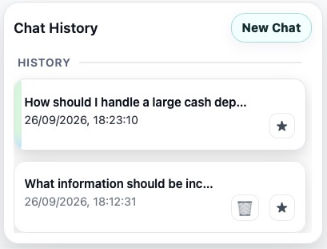
Select a row in Chat History to load its messages. Rows show the conversation title and a date/time. Long titles can be shortened on screen; hovering can reveal the full title. Select a particular answer to restore its sources and fuller response.
History is loaded for your current agent context. If a conversation is not where you expect it, check which agent is active.
Begin a separate topic
Select New Chat. This clears the current working conversation and source focus so you can start again. It does not delete your existing history. Agent-specific suggested questions or a mentor introduction may appear in the new chat.
Keep favourites
Use the star on a chat row to add or remove it from favourites. Favourite conversations appear first, followed by the remaining history, with recently modified items first within each group.
Delete a chat
Use the bin on a non-active chat row and read the confirmation before proceeding. The active conversation’s delete control is hidden; open another conversation or start a new chat first if you intend to delete it. This removes the chat from the list; the customer interface does not expose a restore workflow.
The Talvi Nuggets panel also has its own favourite and deletion controls.