
Explore with Talvi Coach
Keep a question focused on one source instead of searching the whole knowledge base.
Start from a source
Talvi Coach helps you explore one file in more depth. Start with an answer that has supporting sources, then select the small blue sparkle icon attached to the file’s source chip. Selecting the main body of the chip opens the file viewer instead.

For example, ask about Attention Is All You Need, then choose the coaching icon on the paper’s PDF chip. See PDF navigation if you want to read the paper alongside your questions.
Choose a starting point
The Talvi Coach panel shows the selected filename and suggested questions. Check the filename, then select a suggestion to send it. You can also type your own question into Ask this file anything… and select Send.
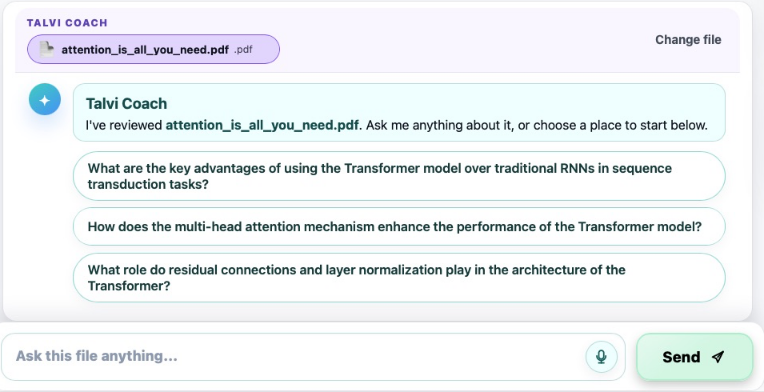
The suggestions relate to the selected source. For this paper, one starting point is “How does the multi-head attention mechanism enhance the performance of the Transformer model?” Other files will offer different questions.
Continue the conversation
A file-focused answer displays Coaching on file: and the filename. Read the response, then choose a follow-up suggestion or ask your own question. For example, you could ask for a simpler explanation, an example, or a comparison of two ideas from the file.
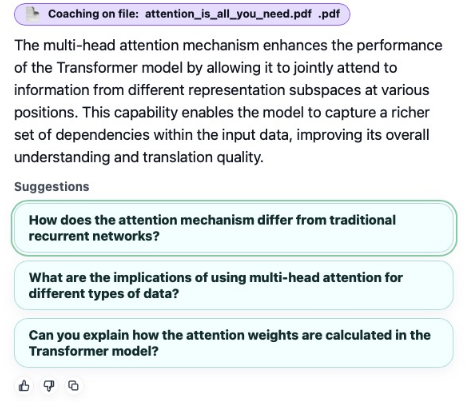
The Coach panel continues to name the file while that focus is active. You can still inspect the supporting sources, copy an answer, or use the thumbs-up and thumbs-down controls.
Change or leave the file focus
Select Change file to clear the current focus. Then choose another source’s coaching icon, or ask an ordinary question across the active agent’s knowledge. Starting a new chat also starts a separate conversation.
Opening a historical Coach answer can restore its file focus, so check the filename when returning to chat history. Coaching works with a file already available to your agent; it does not edit or upload the source.
For a quick outline with navigation links, use AI File Summary. Use Coach when you want to explore the source through questions.