
Talvi system overview
See how your Talvi instance connects source systems, direct experiences, and authorised AI assistants.
The knowledge layer in your ecosystem
Talvi brings organisational content into maintained datasets and makes it useful through authorised AI agents. Employees can use Talvi directly or access its knowledge from a compatible AI assistant through Talvi MCP Server. The same knowledge foundation can support several experiences without each team building its own content-processing pipeline.
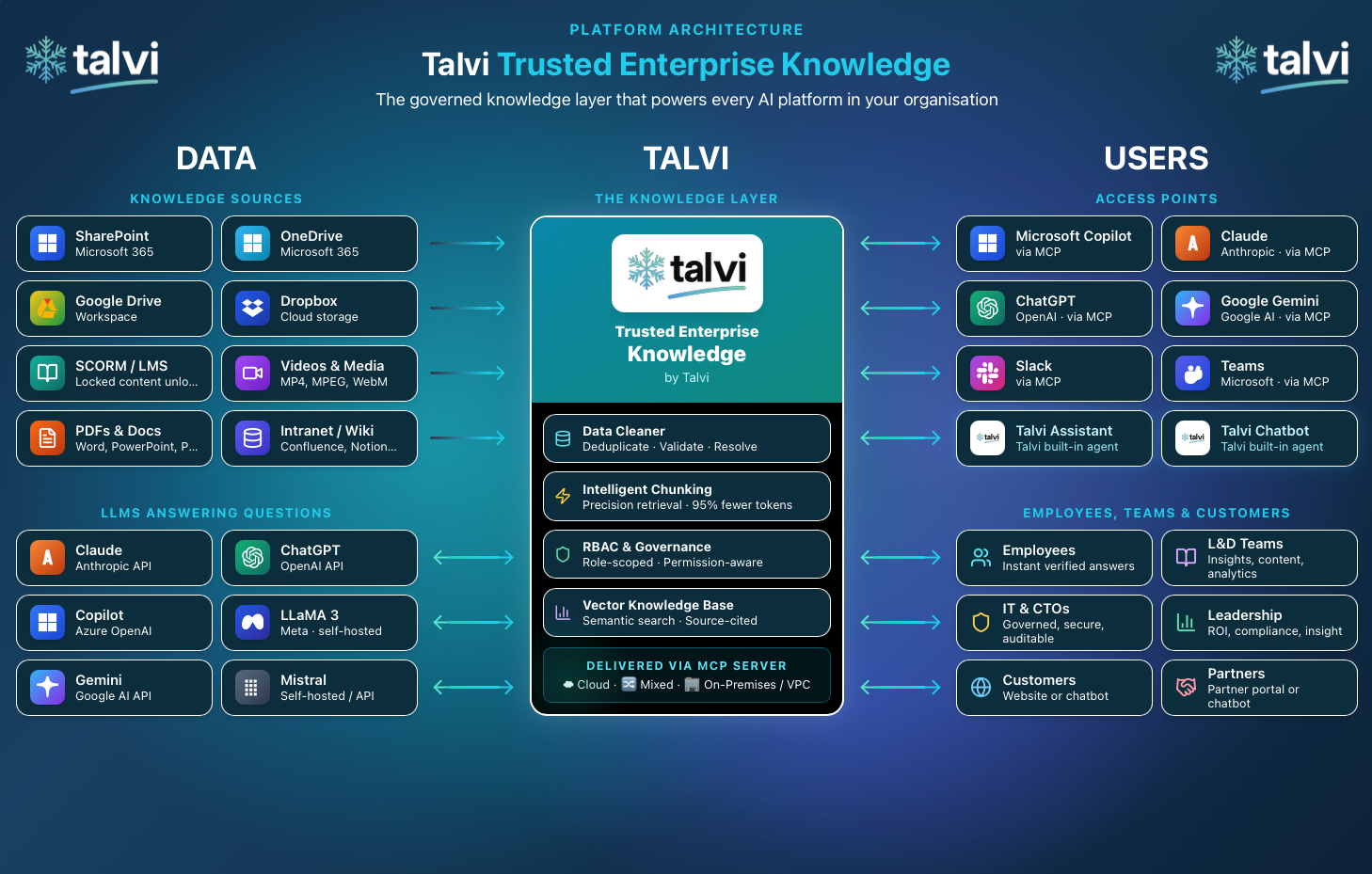
Architecture image supplied from the Talvi website. It illustrates the wider ecosystem; the sources, services, and access points available to your organisation depend on your configured implementation. Token savings shown relate to input context in supported workflows, rather than a guaranteed reduction in the total AI bill.
Your Talvi server instance
Your organisation uses an agreed Talvi server instance: the running platform that hosts its configured content processing, datasets, agents, administration, and enabled integrations. Your administrator provides the login address and, where enabled, the MCP access URL. Those addresses identify the deployment you are connecting to.
Talvi works with your team to agree the deployment model. Cloud, mixed infrastructure, and private infrastructure options are described in Talvi for IT. Hosting location, model services, network access, backups, and operational responsibilities depend on your implementation. A dedicated instance does not by itself describe every external service used by that implementation.
From source content to a useful answer
- Connect or upload content. Bring the agreed files from your LMS, document repositories, content libraries, or device into Talvi.
- Prepare a dataset. Talvi processes supported material into searchable knowledge. A dataset can be connected to several agents.
- Configure an agent and audience. Choose its dataset, purpose, enabled capabilities, and permitted users.
- Ask through an approved access point. Talvi retrieves relevant evidence for the request and returns an answer with supporting references where available.
- Open the source. Supported viewers can navigate to a PDF page, media timestamp, or course section. The client and source format determine the available experience.
- Maintain the knowledge. Review imports, publication, duplicate files, feedback, and usage so the shared foundation remains useful.
See Build a dataset and create an AI agent for the initial workflow. Talvi’s product overview and Talvi in your AI show the broader experience.
Use Talvi directly or through MCP
| Route | How people use it | What must be configured |
|---|---|---|
| Talvi Get Answers | Sign in to Talvi, select an available agent, ask questions, and follow sources. | Account access, agent audience, and the agent’s dataset and capabilities. |
| Talvi website bot | Use an agent embedded in an approved website. | Bot configuration, website integration, allowed origins, and the intended audience. |
| Talvi MCP Server | An approved assistant calls Talvi tools to answer from the connected knowledge or open sources. | An enabled MCP service, a compatible client, and a credential for the intended Talvi user and agent. |
MCP means Model Context Protocol: a standard connection through which a client discovers and calls tools. The connected assistant remains the user’s working surface, while Talvi supplies its configured knowledge services. Relevant evidence and tool results can pass to that assistant and its AI services, so include the client in your organisation’s data review.
Follow Talvi MCP Server, Microsoft 365 Copilot & Teams, or Add your Talvi AI bot to your website. Availability depends on your deployment; not every instance or agent exposes MCP.
Connect your LMS and other content systems
Talvi works with your team to connect the LMS and other systems where the agreed content lives. Custom development may be required for your LMS, a proprietary repository, an internal API, or a source that has no configured connector. Include this work in onboarding rather than assuming a source will appear automatically.
Agree which content is in scope, who authorises the source connection, how files are updated or removed, and which datasets receive them. The content formats Talvi can process and the systems it can connect to are separate questions: importing a SCORM package does not automatically configure LMS sign-on, enrolment, or completion reporting. Any such workflow must be agreed as part of the integration.
Configured optional sources appear in Data Import. Their fields and sync options depend on the implementation. Check the Security and Governance when defining audiences and credentials.
If you connect through Microsoft 365
For organisations using Microsoft 365 Copilot and Teams, the connection is deployed through a Talvi-supplied app ZIP. Your Microsoft 365 administrator imports the app, reviews its permissions, and publishes it to the approved audience. Teams availability depends on the supported host products in your package and your tenant’s policies.
Each user then authorises their own Talvi connection using the MCP access key issued for their Talvi user and AI agent. Microsoft 365 controls whether the app is available to that person; Talvi credentials identify the connected knowledge scope.
Follow Connect Microsoft 365 Copilot & Teams for the illustrated import and governance workflow. This additional Microsoft administration applies when you use that route to Talvi.