
Sign in with a Magic Link
Request a password-free sign-in link for your existing Talvi account.
Request your link
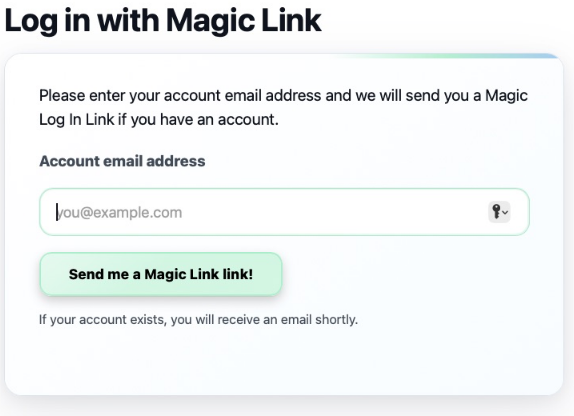
- Open the platform’s Magic Link page from its login flow.
- Enter your account email address in Account email address.
- Select Send me a Magic Link link! (the current button label).
- Look for the message telling you to check your inbox.
- Open the login link from the email to return to Talvi.
The response is deliberately generic: if an account exists, an email is sent. The message does not prove that an account exists or that the email was delivered. A Magic Link does not create a new account.
What happens after opening it?
Talvi exchanges the emailed link for your signed-in session. Ordinary users continue to the assistant. Privileged users can see a destination chooser for Admin dashboard or Talvi Assistant. Choose the assistant for the workflows in this wiki.
The current implementation gives a Magic Link a two-day lifetime and consumes it when used. Request another if it has expired or has already been used. Treat it like a sign-in credential and do not forward it or include it in screenshots.
If the email does not arrive
Check the spelling of the email address, spam/junk folders, and whether your organisation has created that account. Allow for mail-delivery delay. If the problem persists, contact your administrator rather than assuming the generic success message confirms delivery.
An invalid or expired link produces Link invalid or expired and asks you to request a new one. Back to Log in returns to the normal login page. After signing in, use Account to check your identity and Get Answers to begin.