
Create a Talvi Nugget AI analysis report
Define a filtered collection, generate an analysis, and turn recommendations into action.
What you will achieve
Generate a report about a selected collection of Talvi Nuggets, then use Actionable Insights and Strategic Recommendations to plan improvements to learning content and its distribution.
This analyses existing Nuggets and their usage. It does not generate a new learning Nugget or change the publication or access settings of the items being analysed.
1. Define the collection with filters
Open Talvi Nuggets in the admin dashboard. Set both Created from and Created to, then select Apply. Both dates are required for Analyse with AI.
Choose a specific source agent under Show Talvi Nuggets Created in if appropriate, and select Topics & keywords to focus the analysis. For example, analyse a defined period of payslip-related Nuggets when reviewing support for payroll questions.
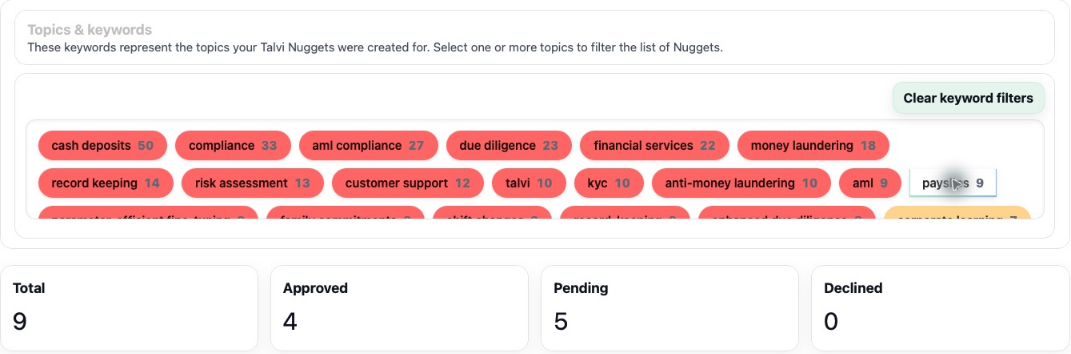
The screenshot illustrates keyword selection; enter and apply your own date range before starting a report. Review the Total, Approved, Pending, and Declined counts. The analysis includes the selected collection across these statuses: the list’s Status display is not an approved-only report filter. The confirmation shows the counts to be analysed.
2. Name and generate the report
Under AI Report Generation, select Analyse with AI. Check the date range and collection counts, enter a meaningful report name, and select Create report. For example, use a name that identifies the topic and review period.
An empty collection cannot be analysed. Adjust the dates, source agent, or keywords if there are no matching Nuggets.
Follow the job under Generated AI reports. Use Refresh while it is processing, then View when completed. The saved report records its own date range and keywords; changing today’s filters does not rewrite an earlier report. Download PDF provides a copy of an open report.
3. Read the evidence behind the recommendations
Start with the report’s overview, Key Metrics, Topic Coverage, usage tables, and Keyword Analysis, where present. Check what was included and whether it has meaningful usage. Views and favourites describe engagement, not a direct measurement of understanding.
Compare the report’s statements with the selected dates, counts, and individual Nuggets. Report wording is AI-generated, so resolve inconsistencies before using a conclusion to make decisions.
4. Turn Actionable Insights into practical work
An example report groups suggestions under Documentation, Information Missing, and Product & Marketing, with an explanation, priority, and confidence for each.
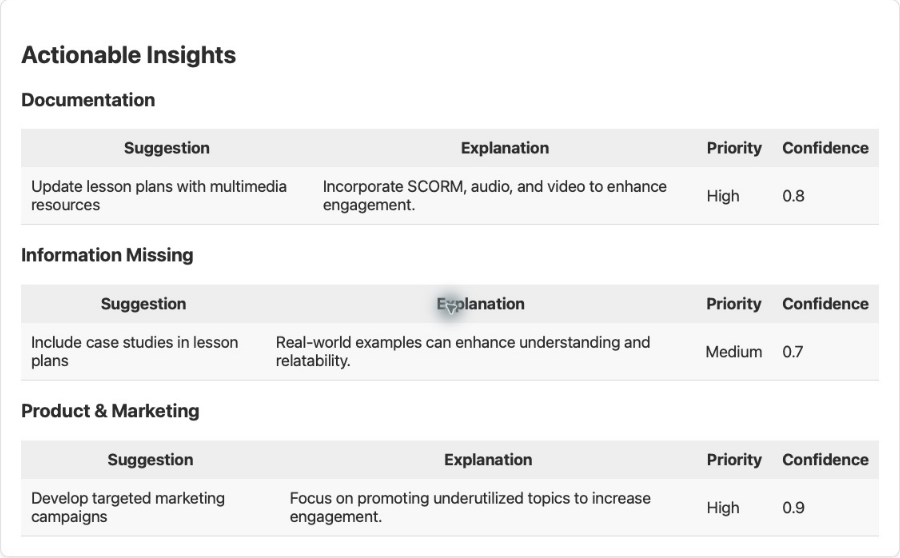
In this example, the report suggests adding multimedia support, including real-world case studies, and promoting underused topics. These provide starting points for review:
| Suggested improvement | A practical response |
|---|---|
| Add multimedia resources | Check whether a short approved video or demonstration would clarify a difficult step. |
| Include case studies | Ask a subject expert for a worked example, then update or create supporting learning content. |
| Promote underused topics | Check publication and user access, then distribute suitable Nuggets to the people who need them. |
Priority and confidence help organise review; they are AI assessments, not verified measures of impact. Validate the underlying need and assign an owner and a review date to the actions you accept.
5. Use Strategic Recommendations to plan the next cycle
Strategic Recommendations brings the suggestions together into broader next steps. In the example, these include collecting user feedback, creating quick reference guides, reviewing engagement regularly, and monitoring keyword trends.
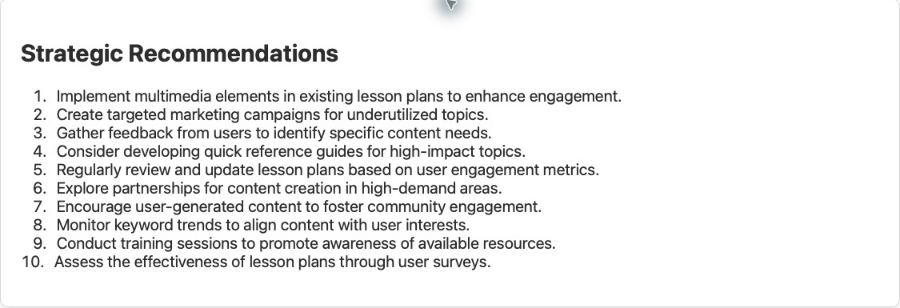
Choose a small set that fits your team’s goals. For a payslip support initiative, you might review a checklist with payroll specialists, distribute the approved version, and compare subsequent questions and engagement over a similar period. This is an example of applying the report, not a claim that its sample recommendations came from payslip-only data.
Run a later report with comparable filters and combine it with user feedback. The value comes from using the findings to prioritise content work, improve access to useful guidance, and check whether the changes helped.
Result: a focused analysis becomes a reviewable improvement plan with clear actions, owners, and follow-up.
See also: Review & publish Talvi Nuggets · Assign and distribute Talvi Nuggets.