
Update your AI agent’s data
Import new knowledge into the dataset already used by your agent.
What you will achieve
Add knowledge to an existing AI agent through Data Import. You update its dataset rather than creating the agent again.
1. Identify the destination dataset
Check the dataset used by your agent. You can also open More.. → File Management and use the linked AI Agents on each dataset card to identify it. Note whether other agents share the collection.
2. Choose the source
Open Data Import → Import New Data. Follow Source → Destination → Sync → Review.
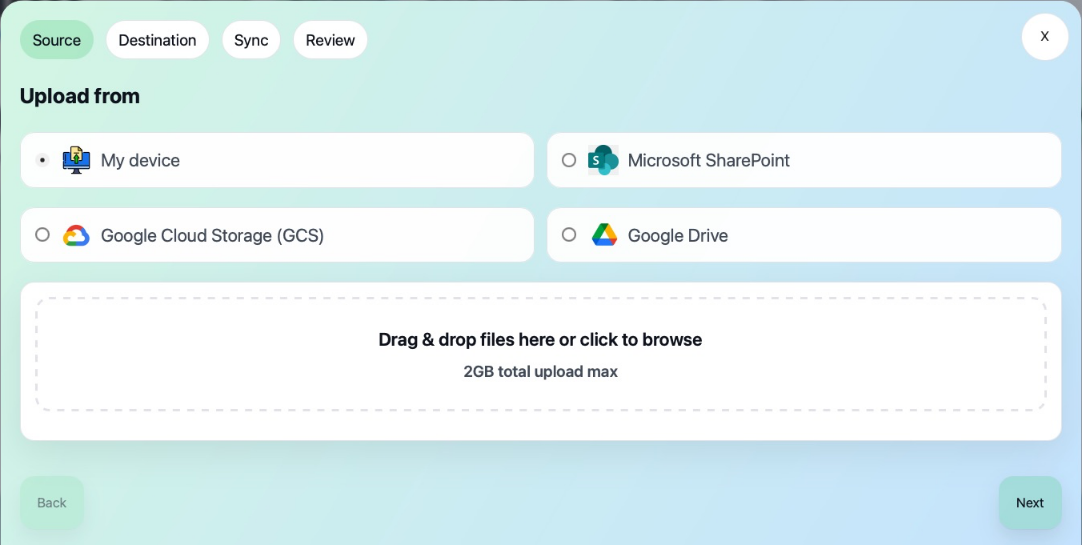
Use My device to upload local files. Microsoft SharePoint, Google Cloud Storage (GCS), and Google Drive are optional import sources configured when your Talvi instance was created. Custom sources may also appear. Use a source available in your instance and provide the connection details it requests.
3. Confirm the dataset and schedule
In Destination, choose the existing dataset and add a short description. Check AI agents using this Dataset before continuing: all agents sharing it may use the new knowledge.
Local uploads run once. A configured connected source may offer a recurring schedule; select No schedule for a one-off import, or choose a suitable supported interval.
4. Review and import
Check the source, destination, and schedule. Tick I’m ready to start the import, then select Begin data import. Keep the page open until the file transfer finishes.
Follow the job in Active imports, then check Completed / Failed. For a failure, inspect the error before retrying. Maintain recurring imports under Scheduled data imports.
5. Verify the updated knowledge
Open the dataset in File Management, find the imported files, and preview one. Then ask the intended agent a question grounded in the new material and inspect the returned source.
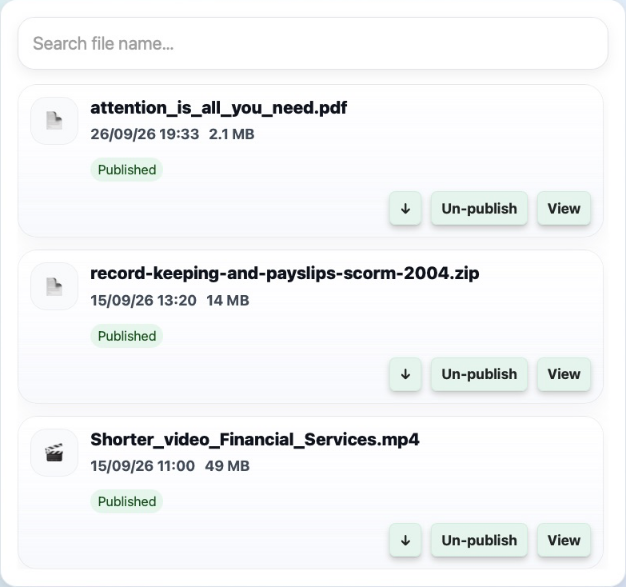
If new material replaces an older document, review the old file explicitly; do not assume that importing a new filename removes an earlier version. Follow Unpublish and remove content, or compare similar files before deciding what to keep. For scheduled sources, also maintain the upstream content so a later sync does not reintroduce unwanted material.
Result: new knowledge is available through the agent’s existing dataset, subject to successful processing and file publication.
See also: Data Import reference · Manage files & availability.