
Assign users to an AI agent
Add or remove an agent’s audience and understand the default agent.
What you will achieve
Give people access to a particular AI agent, or remove an additional agent they no longer need. You need administration permission to manage agent access.
1. Understand the default agent
Talvi always has a default AI agent, available to every user. Its User Access list cannot be edited to exclude individual people. Talvi does not allow the last default to be unset; choosing another default replaces the existing default.
Use a non-default agent when you want to control its audience. Access to an agent determines which knowledge and capabilities people can reach through it.
The platform default is separate from a person’s preferred starting agent. Where switching is enabled, a user with multiple assigned agents can choose their own starting agent in Account.
2. Open the agent’s user list
Open More.. → AI Agents, find the intended non-default agent, and select User Access. In the custom agent workspace, the equivalent entry is Assign User Access.
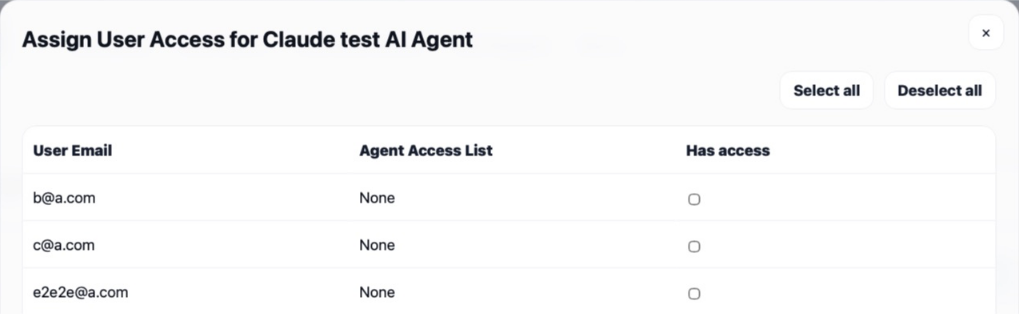
Check the agent name before editing. If its default status prevents editing, use a suitable non-default agent for the restricted audience.
3. Add people
Search for the user by name or email, then turn on their selection. Repeat for the intended people. Clear the search to review the wider list before saving.
Select all selects the users currently matching the search. Clear the search first if you intend to include everyone in the available list. Select Save to apply the audience.
4. Remove people
Reopen User Access, find the person, turn off their selection, and select Save. Remove all clears the users currently matching the search, so review the selection carefully before saving a bulk change.
Removing access to an additional agent does not delete the person’s account or remove their access to the platform default agent. If Talvi reports that a user must retain access to another agent, resolve that assignment before retrying.
5. Check the result
Reopen the access list to verify the saved selections. An assigned user can select the agent where agent switching is available; a removed user should no longer have that additional agent available after their view refreshes.
Result: the agent’s audience matches the people who need its knowledge, while everyone retains the default agent.
See also: Manage AI Agents & user access · View & edit custom AI Agents.